Pages

Showing posts with label mobile. Show all posts

Graph Based Recommendations using "How-To" Guides Dataset

Friday, March 1, 2013


Hi all,

In this post I'd like to introduce another approach for recommender engines using graph concepts to recommend novel and interesting items. I will build a graph-based how-to tutorials recommender engine using the data available on the website SnapGuide (By the way I am a huge fan and user of this tutorials website), the graph database Neo4J and the graph traversal language Gremlin.

What is SnapGuide ?

Snapguide is a web service for anyone who wants to create and share step-by-step "how to guides".  It is available on the web and IOS app. There you can find several tutorials with easy visual instructions for a wide array of topics including cooking, gardening, crafts, projects, fashion tips and more.  It is free  and anyone is invitide to submit guides in order to share their passions and expertise with the community.  I have extracted from their website for only research purposes the corpus of tutorials likes. Several users may like the tutorial and this signal can be quite useful to recommend similar tutorials based on what other users liked.  Unfortunately I can't provide the dataset for download but the code you can follow below for your own data set.

Snapguide 


Getting Started with Neo4J


To create your own graph with Neo4J you will need to use Java/Groovy to explore it.  I found Bulbflow, it is a open-source Python ORM  for graph databases and supports puggable backends using Blueprints standards.  In this post I used it to connect to Neo4j Servers.  The snippet code below is a simple example of Bulbflow in action by creating some edges and vertexes.


>>> from people import Person, Knows
>>> from bulbs.neo4jserver import Graph
>>> g = Graph()
>>> g.add_proxy("people", Person)
>>> g.add_proxy("knows", Knows)
>>> james = g.people.create(name="James")
>>> julie = g.people.create(name="Julie")
>>> g.knows.create(james, julie)

Generating our tutorials Graph


I decided to define my graph schema in order to map the raw data into a property graph so the traversals required to get recommendations of which tutorials to check could be natural as possible.


SnapGuide Graph Schema


The data will be inserted into the graph database Neo4J  The code belows creates a new Neo4J graph with all the data set.

#-*- coding: utf-8 -*-
from bulbs.neo4jserver import Graph
from nltk.tag.hunpos import HunposTagger
from nltk.tokenize import word_tokenize

ht = HunposTagger('en_wsj.model')

likes = open('likes.csv')
tutorials = open('tutorials.csv')
users = open('users.csv')
g = Graph()
def filter_nouns(words):
   return [word.lower() for word, cat in words if cat in ['NN', 'NNP', 'NNPS']]
#Loading tutorials and categories
for tutorial in tutorials:
    tutorial = tutorial.strip()
    try:
 ID, title, likes, category = tutorial.split(';')
    except:
 try:
      ID, title, category = tutorial.split(';')
 except:
      t = tutorial.split(';')
      ID, title, category = t[0], t[1].replace('&Yuml', ''), t[-1] 
   
     tut =  g.vertices.create(type='Tutorial', tutorialId=int(ID), title=title)
     keywords = filter_nouns(ht.tag(word_tokenize(tutorial.split(';')[1])))
     keywords.append(category)

     for keyword in keywords:
 resp = g.vertices.index.lookup(category=keyword)
 if resp is None:
      ct = g.vertices.create(type='Category', category = keyword)
 else:
      ct = resp.next()
 g.edges.create(tut,'hasCategory', ct)
#Loading user dataset.

for user in users:
     user = user.strip()
     username = user.split(';')[0]
 
     user = g.vertices.create(type='User', userId=username)
#Loading the likes dataset.
for like in likes:
    like = like.strip()
    item_id, user_id = like.split(';')
    p = g.vertices.index.lookup(tutorialId=int(item_id))
    q =  g.vertices.index.lookup(userId=user_id)
    g.edges.create(q.next(), 'liked', p.next())
There are three input files: tutorials.dat, users.dat and likes.dat. The file tutorials.dat contains the list of  tutorials. Each row has 2 columns: tutorialId, title and category. The file users.dat contains the list of users.  Each row contains the columns:  userID, user name.  Finally  the likes.dat includes the tutorials that a user marked their interest. Each row of the raw file has : userId and movieId.

Given that there are more than 1 million likes, it will take some time to process all the data. An important note before going on. Don't forget to create the vertices indexes,  if you forget your queries it will take ages to proccess.


  1. //These indexes are a must, otherwise querying the graph database will take so looong
  2. g.createKeyIndex('userId',Vertex.class)
  3. g.createKeyIndex('tutorialId',Vertex.class)
  4. g.createKeyIndex('category',Vertex.class)
  5. g.createKeyIndex('title',Vertex.class)


Before moving on to recommender algorithms, let's make sure the graph is ok.

For instance,  what is the distribution of keywords amongst the tutorials repository ?

  1. //Distribution frequency of Categories
    def dist_categories(){
      m = [:]
     g.V.filter{it.getProperty('type')=='Tutorial'}.out('hasCategory').category.groupCount(m).iterate() 
    return m.sort{-it.value}
    }
>>> script = g.scripts.get('dist_categories')
>>> categories = g.gremlin.execute(script, params=None)
>>> sorted(categories.content.items(), key=lambda keyword: -keyword[1])[:10]
[(u'food', 4537), (u'make', 3840), (u'arts-crafts', 1609), (u'cook', 1362), (u'desserts', 1247), (u'beauty', 1108), (u'technology', 943), (u'drinks', 587), (u'home', 508), (u'chicken', 452)]

What about the average number of likes per tutorial ?

  1. //Get the average number of likes per tutorial
    def avg_likes(){
    return  
    g.V.filter{it.getProperty('type')=='Tutorial'}.transform{it.in('liked').count()}.mean() 
    }

>>> script = g.scripts.get('avg_likes')
>>>likes = g.gremlin.command(script, params=None)
>>>likes
111.089116326

Trasversing the Tutorials Graph

Now that the data is represented as graph, let's make some queries. Behind the scene what we make are some traversals.  In recommender systems  there are two general typs of recommendation approaches: the collaborative filtering and content-based one.

In collaborative, the liking behavior of users is correlated in order to recommend the favorites of one user to another, in this case let's find the similar user.

I like the tutorials Amanda preferred, what other tutorials does Amanda like that I haven't seen ?

Otherwise, the content-base strategy is based on the features of a recommendable item. So the attributes are analyzed in order to find other similar items with analogous features.

I  like food tutorials, what other food tutorials are there ?


Making Recommendations

Let's begin with collaborative filtering.  I will use some complex traversal queries at our graph.  Let's start with the tutorial: "How to Make Sous Vide Chicken at Home".  Yes,  I love chicken! :)

Great dish by the way!
Which users liked Make Sous Vide Chicken at Home ?
  1. //Get the users who liked a tutorial
    def users_liked(tutorial){
       v = g.V.filter{it.getPropery('title') == tutorial}
       return v.inE('liked').outV.userId[0..4]
    }
>>> tuts = g.vertices.index.lookup(title='Make Sous Vide Chicken at Home')
>>> tut = tuts.next()
>>> tut.title 
Make Sous Vide Chicken at Home
>>> tut.tutorialId
11890
>>> tut.type  
Tutorial
>>> script = g.scripts.get('n_users_liked')
>>> users_liked = g.gremlin.command(script, params={'tutorial': 'Make Sous Vide Chicken at Home'})
>>> users_liked
1000
This traversal doesn't provide us useful information, but we could put in action now the collaborative filtering with a extended query:

Which users liked Make Sous Vide Chicken at Home and what other tutorials did they liked most in common to ?


  1. //Get the users who liked the tutorial and what other tutorials did they like too ?
    def similar_tutorials(tutorial){
    v = g.V.filter{it.getProperty('title') == tutorial}
    return v.inE('liked').outV.outE('liked').inV.title[0..4]
    }


>>>> script = g.scripts.get('similar_tutorials')
>>>> similar_tutorials = g.gremlin.execute(script, params={'tutorial': 'Make Sous Vide Chicken at Home'})
>>> similar_tutorials.content
[u'Make Potato Latkes', u'Make Beeswax and Honey Lip Balm', u'Make Sous Vide Chicken at Home', u'Cook the Perfect & Simple Chicken Ramen Soup', u'Make a Simple (But Authentic) Paella on Your BBQ']

What is the query above express ?

It filters all users that liked the tutorial (inE('liked')) and find out what they liked (outV.outE('liked')), fetching the title of those tutorials (inV.title) . It returns the first five items ([0..4])

In recommendations we have to find the most-common purchased or liked itens.  Using Gremlin, we can work on a simple collaborative filtering algorithm by joining several steps together.

  1. //Get similar tutorials
    def topMatches(tutorial){
        m = [:]
    v = g.V.filter{it.getProperty('title') == tutorial}
    v.inE('liked').outV.outE('liked').inV.title.groupCount(m).iterate()
        return m.sort{-it.value}[0..9]

    }


>>> script = g.scripts.get('topMatches')
>>> topMatches = g.gremlin.execute(script, params={'tutorial': 'Make Sous Vide Chicken at Home'})
>>> sorted(topMatches.content.items(), key=lambda keyword: -keyword[1])[:10]
{u'Make Cake Pops!!': 75, u'Make Sous Vide Chicken at Home': 1000, u'Make Potato Latkes': 124, u'Make Incredible Beef Jerky at Home Easily!': 131, u'Cook the Perfect & Simple Chicken Ramen Soup': 96, u'Make Mint Juleps': 74, u"Solve a 3x3 Rubik's Cube": 89, u'Cook Lamb Shanks Moroccan Style': 74, u'Make Beeswax and Honey Lip Balm': 75, u'Make an Aerium': 74}

This traversal will return a list of tutorials.  But you may notice if you get all matches, ther are many duplicates. It happens because who like  How to Make sous Vide Chicken At Home also like many of the same other tutorials.  The similarity between users in represented at collaborative filtering algorithms.


How many of How to Make sous Vide Chicken At Home highly correlated tutorials are unique ?

  1. //Get the number of unique similar tutorials
    def n_similar_unique_tutorials(tutorial){
    v = g.V.filter{it.title == tutorial}
    return v.inE('liked').outV.outE('liked').inV.dedup.count()
    }

    //Get the number of similar tutorials
    def n_similar_tutorials(tutorial){
    v = g.V.filter{it.getProperty('title') == tutorial}
    return v.inE('liked').outV.outE('liked').inV.count()
    }

>>> script = g.scripts.get('n_similar_tutorials')
>>> similar_tutorials = g.gremlin.command(script, params={'tutorial': 'Make Sous Vide Chicken at Home'})
>>> similar_tutorials
37323
>>> script = g.scripts.get('n_similar_unique_tutorials')
>>> similar_tutorials = g.gremlin.command(script, params={'tutorial': 'Make Sous Vide Chicken at Home'})
>>> similar_tutorials
8766

There are 37323 paths from Make Sous Vide Chicken at Home to other tutorials and only  8766 of those tutorials are unique. Using this information we can use these duplications to build a ranking mechanism to build recommendations.

Which tutorials are most highly co-rated with How to Make Soous Vide Chicken ?


>>> script = g.scripts.get('topMatches')
>>> topMatches = g.gremlin.execute(script, params={'tutorial': 'Make Sous Vide Chicken at Home'})
>>> sorted(topMatches.content.items(), key=lambda keyword: -keyword[1])[:10]
[(u'Make Sous Vide Chicken at Home', 1000), (u'Make Incredible Beef Jerky at Home Easily!', 131), (u'Make Potato Latkes', 124), (u'Cook the Perfect & Simple Chicken Ramen Soup', 96), (u"Solve a 3x3 Rubik's Cube", 89), (u'Make Cake Pops!!', 75), (u'Make Beeswax and Honey Lip Balm', 75), (u'Make Mint Juleps', 74), (u'Cook Lamb Shanks Moroccan Style', 74), (u'Make an Aerium', 74)]

So we have the top similar tutorials. It means, people who like  Make Sous Vide Chicken at Home, also like Make Sous Viden Chicken at Home, oops! Let's remove these reflexive paths, by filtering out the Sous Viden Chicken.

  1. //Get similar tutorials
    def topUniqueMatches(tutorial){
        m = [:]
        v = g.V.filter{it.getProperty('title') == tutorial}
        possible_tutorials = v.inE('liked').outV.outE('liked').inV
        possible_tutorials.hasNot('title',tutorial).title.groupCount(m).iterate()
        return m.sort{-it.value}[0..9]
    }


>>>> script = g.scripts.get('topUniqueMatches')
>>>> topMatches = g.gremlin.execute(script, params={'tutorial': 'Make Sous Vide Chicken at Home'})
>>> topMatches.content
[(u'Make Incredible Beef Jerky at Home Easily!', 131), (u'Make Potato Latkes', 124), (u'Cook the Perfect & Simple Chicken Ramen Soup', 96), (u"Solve a 3x3 Rubik's Cube", 89), (u'Make Cake Pops!!', 75), (u'Make Beeswax and Honey Lip Balm', 75), (u'Make Mint Juleps', 74), (u'Cook Lamb Shanks Moroccan Style', 74), (u'Make an Aerium', 74), (u'Make a Leather iPhone Flip Wallet', 73)]

The recommendation above starts from a particular tutorial (i.e. Make Sous Vide Chicken), not from a particular user. This collaborative filtering method is called item-based filtering.   

Given an tutorial that a user likes, who else like this tutorial, and from those what other tutorials do they like that are not already liked by the initial user.

And the recommendation for a particular user ?  That comes the user-based filtering.


Which tutorials that similar users liked are recommended given a specified user  ?


  1. def userRecommendations(user){
      m = [:]
      v = g.V.filter{it.getProperty('userId') == user}
     v.out('liked').aggregate(x).in('liked').dedup.out('liked').except(x).title.groupCount(m).iterate()
      return m.sort{-it.value}[0..9]
    }
>>>> script = g.scripts.get('topRecommendations')
>>>> recommendations = g.gremlin.execute(script, params={'user': 'emma-rushin'})
>>> recommendations.content
[(u'Create a Real Fisheye Picture With Your iPhone', 1156), (u'Make a DIY Galaxy Print Tshirt', 933), (u'Make a Macro Lens for Free!', 932), (u'Make Glass Marble Magnets With Any Image', 932), (u'Make DIY Nail Decals', 932), (u'Make a Five Strand Braid', 929), (u'Create a Pendant Lamp From Coffee Filters', 928), (u'Make Avocado Toast', 926), (u'Make Instagram Magnets for Less Than $10', 923), (u'Make a Recycled Magazine Tree (Christmas Tree)', 923)]

Emma Rushin will really like art and crafts suggestions! :D

Ok, we have interesting recommendations, but if I desire to make another styles of chicken like Chicken Ramen Soup for my dinner, I probably do not want some tutorial of How to Solve a Rubik Cube 3x3.  To adapt to this situation, it is possible to mix collaborative filtering and content-based recommendation into a traversal so it would recommend similar chicken and food tutorials based on similar keywords.
Now let's play with content-based recommendation! 
Which tutorials are most highly correlated with Sous Vide Chicken that share the same category of food?

  1. //Top recommendations mixing content + collaborative sharing all categories.
    def topRecommendations(tutorial){
      m = [:]
      x = [] as Set
     v = g.V.filter{it.getProperty('title') == tutorial}
     tuts =v.out('hasCategory').aggregate(x).back(2).inE('liked').outV.outE('liked').inV
    tuts.hasNot('title',tutorial).out('hasCategory').retain(x).back(2).title.groupCount(m).iterate()
      return m.sort{-it.value}[0..9]
    }
>>>> script = g.scripts.get('topRecommendations')
>>>> recommendations = g.gremlin.execute(script, params={'tutorial': 'Make Sous Vide Chicken at Home'})
>>> topMatches.content
[(u'Make Incredible Beef Jerky at Home Easily!', 131), (u'Make Potato Latkes', 124), (u'Cook the Perfect & Simple Chicken Ramen Soup', 96), (u'Make Cake Pops!!', 75), (u'Make Beeswax and Honey Lip Balm', 75), (u'Make Mint Juleps', 74), (u'Cook Lamb Shanks Moroccan Style', 74), (u'Cook an Egg in a Basket', 72), (u'Make Banana Fritters', 72), (u'Prepare Chicken With Peppers and Gorgonzola Cheese', 71)]

This rank makes sense, but it still has a flaw.  The tutorial like Make mint Juleps may not be interesting for me. How about only considering those tutorials that share the same keyword 'chicken' with Vide Chicken  ?

Which tutorials are most highly co-rated with Vide Chicken that share the same keyword 'chicken' with  Vide Chicken?
  1. //Top recommendations mixing content + collaborative sharing the chicken category.
    def topRecommendations(tutorial){
     m = [:]
     v = g.V.filter{it.getProperty('title') == tutorial}

     v.inE('liked').outV.outE('liked').inV.hasNot('title',tutorial).out('hasCategory').
     has('category' ,'chicken').back(2).title.groupCount(m).iterate()

     return m.sort{-it.value}[0..9]
    }

>>>> script = g.scripts.get('topRecommendations')
>>>> recommendations = g.gremlin.execute(script, params={'tutorial': 'Make Sous Vide Chicken at Home'})
>>> topMatches.content
{u'Make a Whole Chicken With Veggies in the Crockpot': 28, u'Bake Crispy Chicken With Doritos': 30, u'Cook Chicken Rollatini With Zucchini & Mozzarella': 28, u'Make Beer Can Chicken': 23, u'Roast a Chicken': 54, u'Cook the Perfect & Simple Chicken Ramen Soup': 96, u'Pesto Chicken Roll-Ups Recipe': 31, u'Cook Chicken in Roasting Bag': 23, u'Make Chicken Enchiladas': 29, u'Prepare Chicken With Peppers and Gorgonzola Cheese': 71}


Conclusions
In this post I presented one strategy for recommending items using graph concepts. What I explored here is the flexibility of the property graph data structure and the notion of derived and inferred relationships. This strategy could be further explored to use other features available at your dataset (I will be sure that SnapGuide has more rich information to use such as Age, sex and the category taxonomy).  I am working on a book for recommender systems and I will explain with more details about graph based recommendations, so stay tunned at my blog!

The performance ?  Ok, I didn't test in order to compare with the current solutions nowadays.  What I can say is that Neo4J can theoretically hold billions entities (vertices + edges) and the Gremlin makes possible advanced queries. I will perform some tests, but based on what I studied, depending on the complexity of the the graph structure, runtimes vary. 

I also would like to thank Marko Rodriguez with his help at the Grenlim-Users community with his post to inspire me to take a further look into Neo4J + Grenlim! It amazed me! :)

Regards,

Marcel Caraciolo

Deepjewel - Social Media powering Recommendations

Wednesday, January 4, 2012

Hi all,

Happy new year!  My first post this year will be about an idea that I had with my friend Ricardo Caspirro about the next generation of social recommenders in commerce applications and retail stores. What excites me is that this idea came from a conversation that we had in 2009, and since that year we discussed more about what it would be the "Deepjewel".

Deepjewel is a giant knowledge base that encapsulates interesting entities and relationships of the social world in the web.  The social world in this context means all the millions and billions of tweets, Facebook messages, profiles, relationships, blog posting, YouTube videos, and more - a living organism itself, constantly evolving. 


The Deepjewel

But what motivated us to create the Deepjewel?  One of main problems that we face nowadays is the discovery of content and items of our interest.  Many times, for instance, to find a book or a movie that we like, it is required to search at several websites and social networks through the web.  There isn't a tool that allow this connection between items of many domains in a organized and structured way, even for easy access. Those objects are spread over the web, and the recommendations are placed in social networks by comments, results of machine learning techniques or by queries at several web pages or search engines.  The problem becomes worst when we don't know anything about the existence of a certain item, which it could result at never finding out that possible item that would be of our interest. 

The social media is huge and we need tools that performs a deep analysis of all this data, filter out items of my interest, specially from the historical data  (with our permission, of course)  from our presence in the web and bring items and products relevant to us without loosing the discovery process associated with the serendipity.  One of the solutions is a powerful recommender engine fed by this Social Genome.


Hybrid Social Context-Aware Recommender RecDay


This hybrid social context-aware recommender (which we call recday) is a engine composed by several modular components, which we employ a broad range of semantic analysis techniques, including information extraction and integration, natural language processing and machine learning. The main task of this recommender is to analyze information about his posts, bios and relationships/lists collected from the social genome and summarize it (all this data would represent the interests of the user) in profiles, which we could call DNA. Those profiles built by the recday would infer the possible interests of the users and would serve as basis for personalized recommendations of products and services from the retail stores/e-commerce applications.


A perfect example for this proccess, which we call the translation, is when you mentioned several times about Apple products (such as macbook, ipod, iphone, etc) at your tweets. Even you never used the word "Apple", we can use the Social Genome to detect the products and infer that you are interested in Apple products. The following figure illustrate certain kinds of entities and relationships collected in the Social Genome:


The relationships extracted from the social web data

The second step of this engine is to build the user profile. Different from another approaches which it only uses the content or the historical data from reviews or ratings from the user, the Recday would go further and would analyze the temporal context included in the interests of the user. Several reports on consumer behavior show that the user desires are influented by external factors and even the humour or feelings of the person at the certain moment. It is required to collect in a stealth way (with the user permission of course) his social data and build his personality defined by several dimensions. Those dimensions represent the current state of the user which may define what kind of suggestions he would like to receive at that particular moment. For example, if you are happy today because you got a new job and posted at your Facebook about that event or even updated your profile about this new position, it would be a valuable information for your DNA profile in order to recommend products and services to celebrate this occasion (You are happy and excited, don't you think ?).

Another important component in this proccess is the product side. We need extract more information from their products portfolio. Items must be juiced in order to get all its meta-data available. Imagine the movie Batman where we have details about the year, genre, cast, production, direction, sinoypsis, etc. All this data can be used to build the DNA Item and be expressed by a collection of dimensions that represent the item profile. With those profiles (DNA User and DNA Item) we compute the similarity between user and items in order to produce a list of top recommendations and related explanations.


The Social Architecure of the Recommender


The final result can be shown in several mediums: mobile apps, widgets, web, API's, pluggins, etc. It is important the usability and how you will present all this information for a particular user. That's why the user interface must be simple and easy to navigate and have mechanisms to collect the user's feedback for the suggestions given by the engine. This proccess is cyclic, so when you give a feedback (a like or dislike or a comment about the suggestion), this piece of information is handled and leveraged to power your DNA profile.

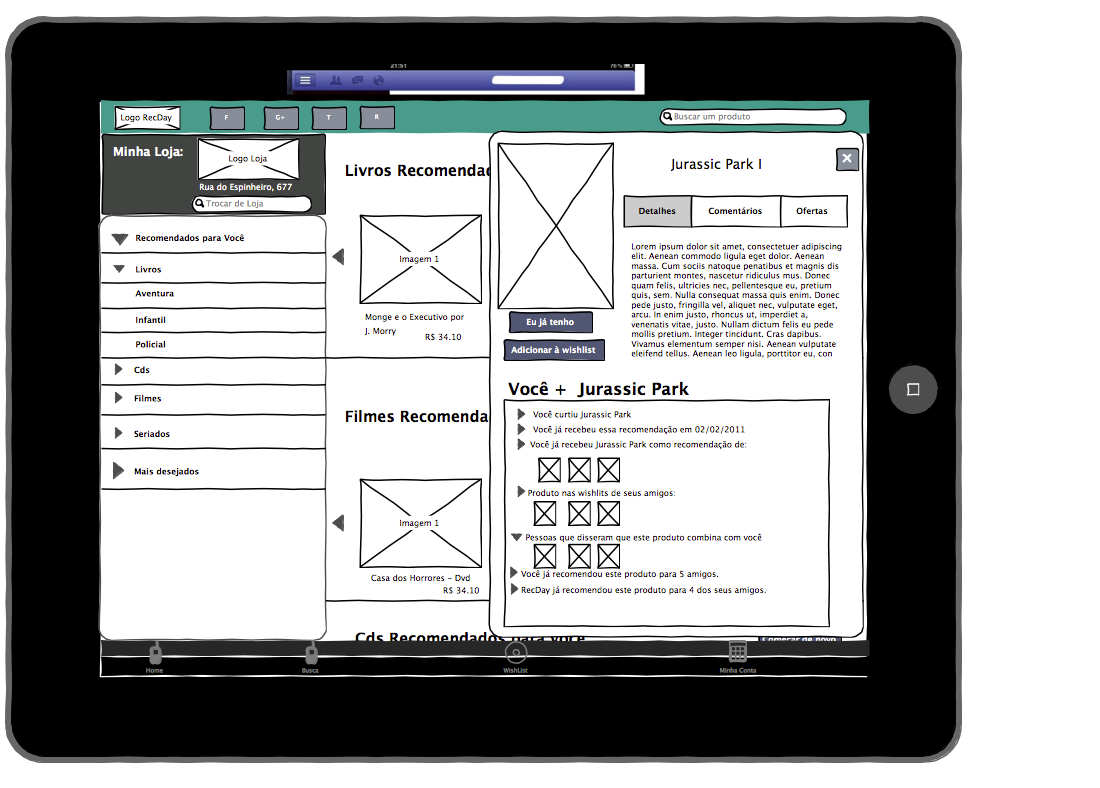
A particular medium of the recommendations: Ipad Demo

In order to build all these interesting technical challenges, we needed to start developing our in-house solution called Crab, which proccesses all this data and employ several analysis and filtering techniques  to deal with the percularities of this heterogeneous sources of data. The first start is the launch of the Deepjewel Labs. Deepjewel is a principle that we can mine the wealth in data, by identifying interesting entities and relationships and converting them into valuable information as input in the recommendation proccess of items and services. 

In summary, all those human and computation techniques can be used to perform a deep semantic analysis of web and social data, where the result for a commerce application or retail store is the ability to offer what the users want before they know that they really want in a personalized way. The RecDay  would be able to daily offer relevant product and services to their customers without they even know it exists. This is a new way to shop in which you don't have to go find products, service and information; the machine will help them find their way to you.

To know more about our Deepjewel labs, visit the website (currently in portuguese):  


I hope you enjoyed,

Marcel Caraciolo

Playing with Foursquare API with Python

Wednesday, December 21, 2011

Hi all,

I'd like to share a project that I am developing that it may be useful for anyone who wants to create datasets from mobile location networks.  Specifically, I developed a wrapper in Python for accessing the Foursquare API called PyFoursquare

For anyone who doesn't know what is Foursquare, it is a popular mobile social-location network with more 10.000.000 of users around the world. The idea is that you can share your current location with your friends and as result discover new places, find where your friends are and even check some tips and recommendations about a place and what to do when you arrive there. It is an amazing project with lots of data available for anyone who wants to develop new apps for connect or mine (data mining) its data!

Foursquare Mobile Application

This Python API is one of the results of my master degree project where I proposed a new architecture for mobile recommenders that fetches reviews from social networks to improve the explanation and the quality of the given recommendations.  I  used this library to collect tips (text reviews) from Foursquare from places at my neighborhood Recife, Brazil.  This API was a little messy, so I decided to clean it up, organize and documment it for publish for the open-source community.

One of advantages of this API is that you can handle each entity from the Foursquare data as Model object. So instead of handling with json dictionaries, I encapsulate the results in the respective models (Venue, Tips, User, etc.) and access its attributes as common object in Python!

I inspired myself at the work of Joshua at Tweepy, which is a Python library for Twitter.  In this version released 0.0.1 I only implemented some API's such as search/venues,  venue_details and venue_tips.  In future releases I pretend to add more models and support for more API methods available at Foursquare.

How can you use it at your project ?

It is simple! Just install it by downloading at the Github's home project, extract the source from the tar.gz and  at the directory of the project run the command below:

$ python setup.py install

or the easier way is to install by the command easy_install:

$ easy_install pyfoursquare


After that, you can  simple test by running the command below at your Python Shell

>>> import pyfoursquare


Now let's see how you can get started with the PyFoursquare:

First you need to create an application at Foursquare. The link is this.  There  you can also get further information about the API, another libraries and several applications using the Foursquarw API's.  

The Foursquare Developer's Settings


After creating your application, you must get the client_id and your client_secret. Those keys will be important to connect the app to the users' accounts.  Foursquare uses the secure authentication based on OAuth2.  In PyFoursquareAPI, you won't need to handle with all steps provided by OAuth2.  It already encapsulates all the steps and handshakes between your app and Foursquare servers. \m/ 

Below the  code you must write for authenticate an user to connect to your app:


After the user  authorized, you now can instantiate the PyFoursquare API.  It will give you access to the Foursquare API methods.  I implemented several methods, but feel free to add new ones! Don't forget to submit the final results as pull requests at the project's repository at Github.

In this example I fetched a venue by giving as input the latitude and longitude and querying for the place with the name 'Burburinho'.  Burburinho is a popular bar nearby where I work!

Source code


Now you can access the result and access the Venue as a Python Object. All elements of the Venue are represented as attributes of the object Venue at PyFoursquare. The goal is to make easier the life of the developer when he access the Foursquare API by parsing all the JSON (the result) and placing in the correct model for him.


I expect you enjoyed this API. Feel free to use it at your applications or research!  I'd like to thank the Foursquare team for expose their data by providing those API's!  For data mining researchers instered in mobile location data, it is a mine of gold!

Further information about PyFoursquare, you can find here.

Feel free to give sugestions, improvements and comments,

Regards,

Marcel Caraciolo